October 5, 2023
LinkedIn is a social media platform dedicated to the professional world. It can boost your gaming career, from valuable industry insights to job opportunities. Moreover, LinkedIn’s networking features are excellent for connecting with esports experts and aspiring professionals. Whatever you wish to achieve on LinkedIn, your profile is the first thing peers and recruiters look at when they come across you. Here is how to create a LinkedIn profile that makes you stand out. I will go through every part of a LinkedIn profile and share tips on leaving a memorable impression!
Profile Picture
Your profile picture is visible in every LinkedIn interaction, even outside your profile page. Therefore, it should be enticing and represent what you stand for. In the past, profile pictures on LinkedIn were supposed to look “professional”, with strict preferences for your facial expressions, background, and style. However, the meaning of “professional” has evolved. Now, you have more freedom to express yourselves through your profile picture. Here are some factors to consider when choosing the right one:
- Your personality
- Your work ethic
- Your values
- Your industry or preferred job
Banner
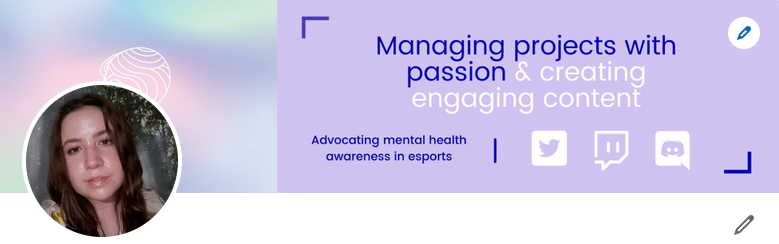
Your banner shows on your profile page, with your profile picture and intro. Although this is a great opportunity to sell yourself in a visually compelling way, many LinkedIn users keep the default banner. Don’t be one of them! Instead, refer to the list of factors from the previous section when designing your LinkedIn banner. In addition, the banner offers even more creative freedom! For example, you can choose between photos related to your work, colorful graphics, and minimal designs. You can also add text elements underlining your personal brand. If you are unsure about the style of your banner, ask yourself:
- What colors do I resonate with?
- What headline describes my way of working?
- What value do I add to an organization?
Finally, you can create an outstanding banner without being a professional graphic designer. Canva’s design tools and banner templates make your job easy! Below is an example of my LinkedIn banner and profile picture combination.
Intro
Your profile intro shows the most important insights about you and your career. Most fields are mandatory and do not leave room for customization. For example, you must add a country in the location field. However, the headline can be used to make yourself stand out. Users see this underneath your name when you show up in their feed. Your headline may include various information, such as
- Your current position,
- Your industry or specialization, and
- A unique and eye-catching phrase.
Tip: Check your contact info and select a professional-looking email address!
Underneath your intro, you find the open to button. Here you can select whether you want to publicly display if you are
- Looking for work,
- Offering a service, or
- Hiring.
About
Next, users will see your about section. This part is a bit like the intro to a cover letter. It summarizes your career, ambitions, and what makes you a unique asset to any employer. But as LinkedIn is a social media platform, I suggest not sounding too archaic. Instead, let your personality shine through with unique language! You will find a lot of similar buzzwords in others’ about sections, such as
- “Highly dedicated engineer” or
- “Marketer with excellent communication and teamwork skills”.
Implementing some of these is fine, but mix them with personalized phrases. You do not want them to make up most of your section. You may choose short bullet points or elaborate text in terms of structure. Everything goes as long as it fits your brand!
Tip: If you write a text for your about section, divide it into bit-sized paragraphs to avoid causing reader fatigue.
If you struggle to draft a compelling about section, you can also follow this simple yet effective outline:
- Where are you at right now in your career?
- Where have you been previously, and what did you contribute or achieve there?
- Where do you strive to be in the future?
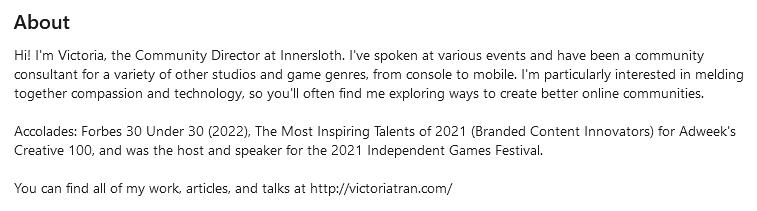
Below is an example of a well-written about section by the Community Director of Innersloth, Victoria Tran.
Core profile sections
These are the sections that are a must on every well-designed LinkedIn profile. I will go through each and share some tips.
Experience & education
In the experience, you can present all your current and previous professional experience. LinkedIn makes this process straightforward, as you only have to fill in the prompted fields. If you are new to esports, you might not have any prior esports experience. In that case, feel free to add your work outside of esports! This experience is also valuable and may highlight transferrable skills.
Tip: Use bullet points or short sentences in the job description and focus on specific achievements. It is even better if these achievements can be measured with KPIs (key performance indicators).
I have two tips about the section displaying your education. First, you may include ongoing education that is not completed yet. Second, adding your high school is unnecessary if you have already completed higher education.
Skills
In the skills segment, you should list every single soft and technical skill you have. But that can easily feel overwhelming to other users. Instead, concentrate on 4-6 skills essential to your career. The order of skills matters, too. LinkedIn displays the first three skills you have selected on your profile. The rest can only be seen by clicking “show all skills”. If you feature technical skills like SEO, consider demonstrating them by doing a short skill quiz on LinkedIn. This adds more credibility to your skill selection.
Tip: Kindly ask your teachers, mentors, or managers to endorse your skills on LinkedIn. Skill endorsements show in your skills section and serve as small vouchers.
Career Break
Do you have any gaps in your CV that you would like to address? The career break feature is perfect for that! Although listed as a core segment on LinkedIn, this is less important than the other sections in this category.
Recommended Sections
In this part, I will highlight non-essential profile sections that will help you stand out.
Licenses & Certifications
If you have completed any licenses and certifications, you can feature them on your LinkedIn profile. Doing so shows your dedication and willingness to supplement and develop your skills. Moreover, certifications in soft skills, such as digital communication, can give your skill section more credibility.
Languages
Speaking multiple languages is a valuable asset in the globalized esports industry. Furthermore, it opens the door to more diverse job opportunities.
Recommendations
Recommendations on LinkedIn are like digital letters of recommendation. They are short paragraphs outlining why someone values your work. You can receive recommendations and give them to other LinkedIn users. They are extremely valuable to recruiters since they provide an outside perspective on what you bring to the table. But do not stress about collecting recommendations. They are nice to have but not a requirement. Moreover, the longer you work in esports, the more likely you will receive them.
Tip: Kindly ask someone you have just worked with to write a recommendation on your LinkedIn profile.
Conclusion
This concludes my guide on how to create a compelling LinkedIn profile. I hope this helped you get started on the platform! LinkedIn offers more sections than I have mentioned here. So, I recommend browsing through all the options and adding those that apply to your case. Good luck with your networking!
Feel free to connect and chat with me on LinkedIn!